███╗   ██╗██╗██╗██╗  ██╗   ██████╗██╗ █████╗  ██████╗  ██╗
  ██║██║██║╚██╗██╔╝  ████╗  ██║  ██╔══██╗██╔══██╗██╔════╝██║
  ╚███╔╝ ██║██║██║ ██╔██╗   ███████║     ███████║██████╔╝██║
  ██║╚██╗██║██║██║ ██╔██╗   ██╔══██║██╔══██╗██║     ██╔══██║
  ██╗ ╚████║██║██║██╔╝ ██║  ██║  ██║╚██████╗██║  ██║██║  ██║
  ╚═══╝╚═╝╚═╝╚═╝  ╚═╝  ╚═╝  ╚═════╝╚═╝  ╚═╝  ╚═╝╚═╝ ╚═╝  ╚═╝
limine · · · luks2 btrfs · · cachyos gaming gnome
────────────────────────────────────────────────────────────────
~ root@archiso $ '\r') -d <(curl https://arch.niiix.net/install | -s tr bash
UEFI only Dual-boot Single-boot Secure Boot OFF Btrfs LUKS2 ZRAM CachyOS Gaming GPU Auto Source Open

does What it

// Partitioning 01
Encrypt & Partition
partition space it disk (dual-boot) a with out encrypts or from your drive carves free Detects layout, wipes the (single-boot), and LUKS2 using a provide. passphrase you
// 02 Filesystem
Subvolumes Btrfs with
Formats container LUKS inside with the Btrfs subvolumes: and four creates @, @home, @snapshots, and @var_log — one. snapshot-ready from day
03 Base // Install
Bootstrap Arch
Runs pacstrap set, sets curated a with package locale ( fstab, generatesen_GB.UTF-8and creates with hostname, ), user timezone, sudo your access. account
04 Drivers // GPU
GPU Auto Detection
the installs stack correct at Identifies GPU — for driver runtime your NVIDIA or proprietary), (open AMD (RDNA2/3/4 aware), or Intel automatically.
// 05 Kernel
+ Scheduler BORE CachyOS
and CachyOS the repository queues Adds linux-cachyos the BORE the scheduler. stock replacing for for kernel with tuned first-boot, using one responsiveness
// Bootloader 06
(UEFI) Limine
Installs and configures Limine Windows entries other and detected preserved automatically. the existing Dual-boot partition. systems and EFI on have
Desktop // 07
Customised GNOME
A polished GNOME a 2-in-1 automatic desktop convertible a a / on start for taskbar, Wayland dark accents, with rotation laptops. menu, screen and pink with system-tray support, theme bottom searchable
Gaming // 08
Ready Play to
with Ships Steam, Lutrisand , Heroiclatest plus , the GE-Proton, Gamescope, GameMode, MangoHudVKD3D — Wine, and with , ntsync games. enabled lower-overhead for Windows
09 // Performance
for Tuned Speed
BORE the plus scx_lavd scheduler, ZRAM swap, ananicy-cpp fair-queue BBR priorities, I/O scheduler, + process networking, transparent NVMe-aware an a raised hugepages, and vm.max_map_count modern titles. for
// 10 Snapshots
Btrfs Net Safety
Snapper with snap-pac pre/post change, and every on a takes bootable automatic snapshots package @clean a rolls known-good back the in entry from Limine the menu. to system boot state
11 Software //
Apps & Tools
flat custom A theme icon install auto-icons (with for anything you later), fastfetchthe plus browser, Helium phone-friendly , Stremio, GNOME a Tweaks, hotspot Wi-Fi helper and updates. Snapper-aware
12 Desktop //
The Desktop
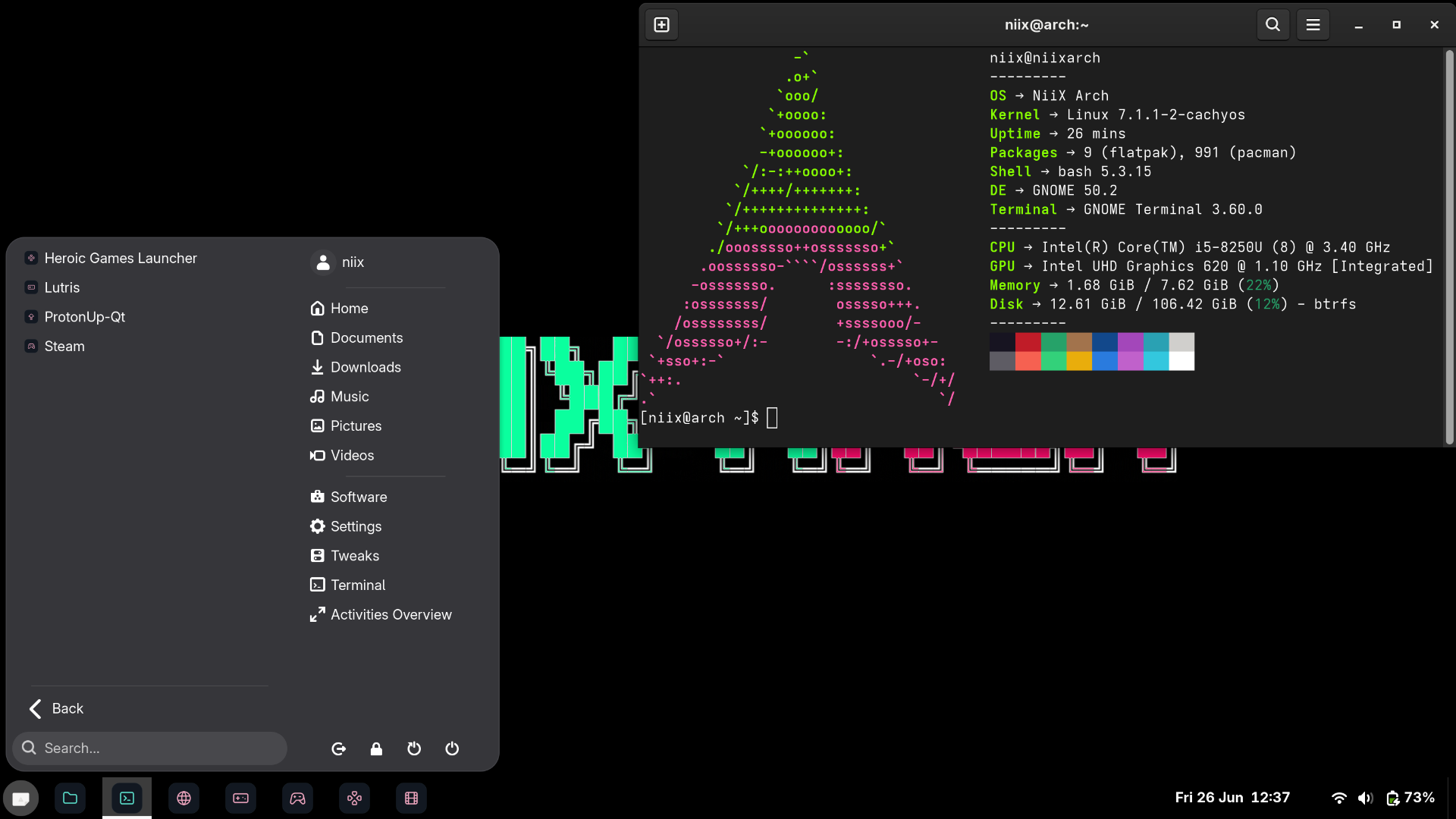
NiiX Arch desktop screenshot enlarge to Click

Stack Hardcoded

·BootloaderLimine (UEFI)Boot Secure No
·EncryptionLUKS2Full-disk, passphrase
·FilesystemBtrfs @snapshots, @, @var_log — @home,noatime, zstd
·Kernellinux-cachyos (BORE)boot First
·SchedulerBORE + scx_lavdLow latency
·SwapZRAM auto-sized) (zstd,partition No
·DesktopGNOME — taskbar, icons flat start menu,pink Wayland · accent
·Localeen_GB.UTF-8mirrors CH
·Keyboardch us /Interactive
·GPU DriversAuto-detected / Intel AMD NVIDIA — /RDNA gen-aware
·Securityufw firewall + hardeningmitigations · random toggle MAC
·GamingHeroic · Steam Lutris ·GE-Proton, Gamescope
·SnapshotsSnapper + snap-pac@clean fallback
·Hotspotniix-hotspot (2.4 GHz, WPA2)Phone-friendly
·UpdatesAutomatic via systemd timerEvery 12h

Install Modes

Dual-Boot //
alongside Arch Install Windows carves your partition your out on disk partition same left the free/unallocated existing drive. space, another script (or OS) existing — detects OS a then is new The EFI and untouched.
  • free/unallocated Requires target space on the drive
  • is partition EFI reused reformatted) (not Existing
  • are Windows and preserved entries boot other
  • added bootloader existing Limine alongside
Single-Boot //
takes Arch the drive wholeclean are Ideal partitions partition. existing The EFI encrypted dedicated wiped. machine All one creates a data a . fresh for script and and or partition root slate. a
  • drive recovery Entire is — no target erased
  • created partition New MB) EFI (512
  • Btrfs Remainder is LUKS2-encrypted
  • targets devices and excluded from loop drives USB

Run to How

01
Download Linux the Arch ISO
to Go archlinux.org/download like ISO. and grab a using to a Flash it latest tool the USB drive Rufus (Windows), Etcher, or dd (Linux/macOS).
02
from the USB Boot
computer and boot press Restart your key menu (usually the F12, F2, DELor , ESC select manufacturer) it — drive. to Make sure the varies by USB mode UEFI is and active Secure Boot is disabled Limine Boot. settings in Secure a not support prompt. land terminal your at you Once root the boots, — does BIOS/UEFI ISO will Note: a ISO the Arch defaults to keyboard layout USsome so (like keys , @, #, \) different you installer be your will positions own may you than layout expect — let the later. pick in
03
Connect the to internet
If you are using Ethernet connected are step to 04. skip already you — cable), (a

using you If are Wi-Fithe following type , commands time. at a one Replace your-wifi-name of network: the Wi-Fi with your name
root@archiso $ ~ iwctl
[iwd]# station connect wlan0 your-wifi-name
Passphrase: as Enter press Wi-Fi won't you type) your password type (it then show
[iwd]# + C press exit iwctl Ctrl to
You the now at back should be root@archiso prompt. If name it wrap in has Wi-Fi the quotes: spaces, connect station "My Wi-Fi Name" wlan0
04
NiiX installer Arch Run the
command and paste terminal, this press the then into Copy Enterscript It . immediately: runs the installer downloads and it
$ root@archiso ~ -d bash <(curl https://arch.niiix.net/install | -s '\r') tr
Tip: cannot try into if the you paste terminal, Shift Ctrl + V + + Ctrl V). (not
05
the Follow prompts
The ask is you It decision. interactive guides you for: every installer will and fully through
· whether to on Windows drive or to wipe (and keep drive) the install which
— your · protects passphrase data an (this encryption every this time you you will boot type, so memorable) pick something
a your hostname, for · new password username, system and
timezone layout and your · keyboard

picks defaults The are sensible safe choice. Read Enter — the unsure, if pressing carefully. each prompt usually
06
& done Reboot
reboot. you must to USB if before installer be the drive finishes, The something typing inserted it drive. USB completes later), then save By offer second will to the a installer (useful goes to wrong logs ask When reboot. drive Remove USB the when prompted.

includes a the setting minutes — system the will up this finish few takes boot, in On and the background automatically first kernel CachyOSyou theme. icon stack, to time customisation, the final , reboots and it gaming done, system full ready one are your and is Once go. desktop the

Requirements

BEFORE YOU RUN ✗
  • be Secure Boot must OFF in firmware BIOS UEFI /
  • mode only — Legacy is UEFI supported not BIOS
BIOS) (not legacy UEFI systemsupport firmware 2012 check your settings made Most after — machines UEFI
disabled Secure BootBoot support in Limine settings the does before not disable Secure it booting ISO UEFI —
connection Internet live ISO the Arch onUse for packages. Required iwctl in Wi-Fi Ethernet for or plug
free/unallocated space drive Dual-boot: target the onfirst your partition Windows in Disk needed Management if Shrink
willing wipe a are to Single-boot: completely you driveup destroyed permanently — be data back first All will
64-bit or Intel) (AMD CPU x86— GPU both for auto-detected and is drivers not supported ARM microcode vendors

Open Source

Open // & Free
the source. Read
NiiXArch is source fully opensurprises what home, the steps, Every installer auditable, line read — readable, is no is hidden phoning and runs forkable. you exactly . your no what of No machine. on

you is directly The it. script install at the you should URL. served full curl-pipe-bash anything, read Before
arch.niiix.net/install
read source the building it open keep keep · ·

can distance a see only "We ahead, short
plenty be needs but done." can to we that there see

"If is impossible, something not
there must way a to it." be do

power. is "Information power, all But like
want there to are for keep those who themselves." it
· Swartz Turing ◈ Winton ·